
My software does not show the card number
Is the number shown in the access control software not the one printed on the card? Find the reading format, and the reader setting to ask for.
Why two different numbers?
A card carries a single number, but the reader does not always transmit it in full or in the same order. Depending on its output format, it sends only part of the number, or sends it reversed. The access control software displays what it receives: so it is not necessarily the number printed on the card, nor the one read by another application.
In this example, the card carries the number 0305419896. In 26-bit Wiegand, the reader only transmits the last 3 bytes: the software displays 3430008.
Find the format of your card
- Note the number printed on the card, or the one read by another application.
- Present the card to the reader and note the number that appears in your access control software.
- Enter both numbers below: the tool looks for the format that links them.
Numbers can be entered in decimal or hexadecimal; the tool tries both. A two-part number, such as 52,22136, is read as a facility code followed by a card number. The calculation is done in your browser: no number is sent to a server.
Getting another number in the software
The number displayed depends on the output format of the reader. For the software to display another number, for example the one printed on the card, it is the reader that must be set to the required format. Once both numbers are entered, the table above shows the number the software would display with each format.
How to change this format depends on the reader: configuration card, manufacturer software or part number to order. Also check that the controller accepts the chosen format. Tell us your reader and the format you want, and we will tell you how to get it.
See also: the Wiegand converter, the Crosspoint converter and the access control wiring diagram.
Read the number yourself: the Satellit'
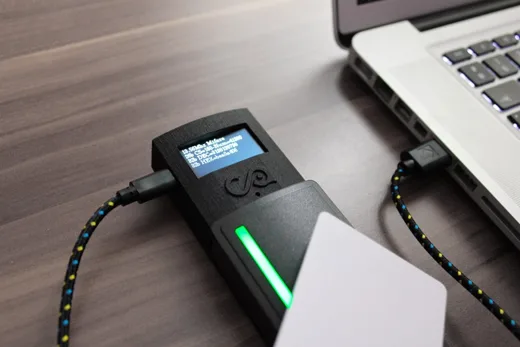
The Satellit' is a SCAP USB desktop reader and enrolment reader with an OLED display. It is built on the RE3T reader: two antennas, 125 kHz and 13.56 MHz. It reads EM, TEMIC and HID Prox cards, as well as the serial number (CSN) of MIFARE Classic and MIFARE DESFire cards. For this search, it does the work for you.
- It identifies the card. Present the card: the Satellit' recognises its technology.
- It gives every reading of the number. The same card can be read in several ways: the Satellit' gives you its number in each of the possible formats.
- You cross-check with your software. Find the reading identical to the number displayed by your access control software: you then know the format used on your site.
It plugs into a USB port, with no driver to install, and works in keyboard emulation: the number is typed wherever the cursor is, in the format chosen for each type of card.